Lighting the RGB LED
How to lighting the RGB LED
Install Library
- Install library from github:
- Librarys:[NeoPixel_Bus] from Makuna
- Download libraries and put it in the libraries folder in the installation directory of the Arduino IDE
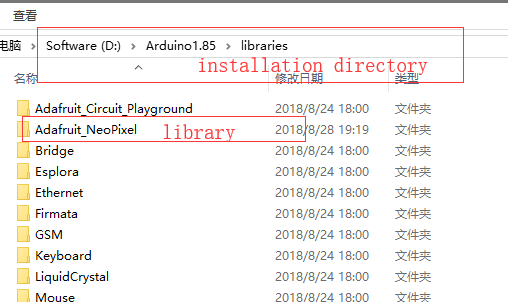

- Install Library by Manage Libraries:


Programe Code
- Open Arduino IDE
click 'file'->'Example'->'NeoPixel Bus'->'simple' to open the example

- We need to change some code,Find the code below in the code
const uint16_t PixelCount = 4; // this example assumes 4 pixels, making it smaller will cause a failure const uint8_t PixelPin = 2; // make sure to set this to the correct pin, ignored for Esp8266
- change to
const uint16_t PixelCount = 25; // this example assumes 4 pixels, making it smaller will cause a failure const uint8_t PixelPin = 4; // make sure to set this to the correct pin, ignored for Esp8266
- Then add the following code to void setup()
- define LED_POWER 2
pinMode(LED_POWER, OUTPUT); digitalWrite(LED_POWER, HIGH);
- Compile this program

And download it(Set the serial port and board)