Lighting the RGB LED: Difference between revisions
Jump to navigation
Jump to search
legacy>Hulkwang No edit summary |
legacy>Hulkwang |
||
| Line 4: | Line 4: | ||
# Install library from github: | # Install library from github: | ||
* Librarys:[[https://github.com/ | * Librarys:[[https://github.com/Makuna/NeoPixelBus NeoPixel_Bus]] from Makuna | ||
* Download libraries and put it in the libraries folder in the installation directory of the Arduino IDE | * Download libraries and put it in the libraries folder in the installation directory of the Arduino IDE | ||
| Line 12: | Line 12: | ||
# Install Library by Manage Libraries: | # Install Library by Manage Libraries: | ||
[[File:LightingLED-4.png]] | [[File:LightingLED-4.png]] | ||
[[File:LightingLED- | [[File:LightingLED-6.png]] | ||
=== Programe Code=== | === Programe Code=== | ||
Revision as of 07:05, 10 September 2018
How to lighting the RGB LED
Install Library
- Install library from github:
- Librarys:[NeoPixel_Bus] from Makuna
- Download libraries and put it in the libraries folder in the installation directory of the Arduino IDE
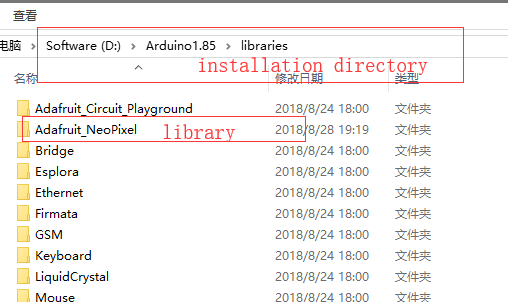

- Install Library by Manage Libraries:


Programe Code
- Open Arduino IDE
click 'file'->'Example'->'Adafruit NeoPixel'->'simple' to open the example

- We need to change some code,Find the code below in the code
 #define PIN            6
 #define NUMPIXELS      16
- change to
 #define PIN            4
 #define NUMPIXELS      25
 #define LED_POWER      2
- Then add the following code to void setup()
  pinMode(LED_POWER, OUTPUT);
  digitalWrite(LED_POWER, HIGH);
- Compile this program

And download it(Set the serial port and board)