Using 4G module with BananaPi: Difference between revisions
Jump to navigation
Jump to search
No edit summary |
|||
| (18 intermediate revisions by the same user not shown) | |||
| Line 1: | Line 1: | ||
=BPI-4G LTE module with banana pi= | =BPI-4G LTE module with banana pi= | ||
=How to use BPI-4G LTE module with BPI-R2= | |||
==Get startting== | |||
*forum pthread for discuss : http://forum.banana-pi.org/t/how-to-use-bpi-4g-lte-module-with-bpi-r2/5223/4 | |||
[[File:Usb_4g_1.jpg]] | [[File:Usb_4g_1.jpg]] | ||
| Line 37: | Line 41: | ||
::[[File:Usb_4g_8.PNG]] | ::[[File:Usb_4g_8.PNG]] | ||
::A:The root cause is the Modem.service has used the module usbserial, so the 4G module can’t use usbserial; we can solve the problem by using command "systemctl disable ModemManager.service " or "systemctl stop ModemManager.service " | ::A:The root cause is the Modem.service has used the module usbserial, so the 4G module can’t use usbserial; we can solve the problem by using command "systemctl disable ModemManager.service " or "systemctl stop ModemManager.service " | ||
*(3) Q:How to test the communication between SIM card and 4G module? | |||
::A:Use minicom, ”minicom -D /dev/ttyUSB2”,and then use AT commands to test, such as ”at”,”at+csq”,“at+ccid”,if you get response without error,that means the communication is OK. | |||
*(4) Q: How to install libqmi? | |||
::A: Download from here: http://www.linuxfromscratch.org/blfs/view/cvs/general/libqmi.html 1 ; then make and make install. | |||
::If you meet this: | |||
::[[File:Usb_4g_9.PNG]] | |||
::you need to install libgudev-1.0-dev, then make and make install again. | |||
*(5) Q:How to use qmi-wwan? | |||
::A:There is a very easy way to use,I’ve put quectel-CM in home path of root,just execute “./quectel-CM &”,then execute “dhclient wwan0”,now you have finished the configurations. | |||
*(6) Q:How to use GPS? | |||
::A:BPI-4G module supports GPS and BeiDou,execute “minicom -D /dev/ttyUSB2”,then input AT commands like this: | |||
::[[File:Usb_4g_10.PNG]] | |||
::if you want to use BeiDou,just input AT commands like this: | |||
::[[File:Usb_4g_10.PNG]] | |||
*(7) Here are kernel configurations and driver patch for kernel 4.14. | |||
::config : http://forum.banana-pi.org/uploads/default/original/2X/5/54a89518b88857f06fd44757d3413e700338b269 | |||
::patch : http://forum.banana-pi.org/uploads/default/original/2X/5/5739bb02c8dc5817ed8ba6ec466b4bdb70cf37fa | |||
*(8) Support areas: | |||
::EC25-E support: EMEA/Thailand/India/South Korea | |||
::EC25-AU support: Australia | |||
::EC25-V/-A support:North America | |||
*(9) Openwrt Supported: | |||
::A. Clone the source code from this link : [http://forum.banana-pi.org/t/bpi-r2-openwrt-lede-souce-code-2018-04-11/5395 BPI-R2 OpenWrt(LEDE) Souce code : 2018-04-11] | |||
::B. Add qmi-wwan driver to this project : | |||
::::Execute “./scripts/feeds/ install minicom” to install minicom to openwrt project | |||
::::Execute “./scripts/feeds/ install python” to install python to openwrt project | |||
::::Execute “make menuconfig” | |||
::::Add minicom “Utilities —> Terminal —> minicom” | |||
::::Add python “Languages —> Python” | |||
::::Add driver “Network —> wwan …Genetic OpenWrt 3G/4G proto handler” | |||
::::Add "Kernel modules —> USB Support —> | |||
::::kmod-usb-core | |||
::::kmod-usb-net —> kmod-usb-net-qmi-wwan | |||
::::kmod-usb-ohci | |||
::::kmod-usb-serial —> kmod-usb-serial-option , kmod-usb-serial-wwan | |||
::::kmod-usb-uhci | |||
:::: kmod-usb2-* | |||
::::Use these source files to replace your openwrt project source files (“build_dir/target-arm_cortex-a7+neon-vfpv4_musl_eabi/linux-mediatek_32/linux-4.9.44/drivers/usb(or net)/…”) : | |||
::::[[File:Usb_4g_12.PNG]] | |||
::C. Image & Stuff Link : | |||
::::Baidu Drive : https://pan.baidu.com/s/1e6bvsznfFW3PuaONz0OR1Q | |||
::::Google Drive : https://drive.google.com/file/d/1Zjj0TiZOFGlmAGmRmErqnwdSosUrLUPZ/view?usp=sharing | |||
::D. Cross-Compile quectel-CM | |||
::::Copy “quectel-CM” to Linux host PC,and change “Makefile” under the “quectel-CM”,change tools like this:The tools are under openwrt project,you can find them according to the following picture. | |||
::::[[File:Usb_4g_13.jpg]] | |||
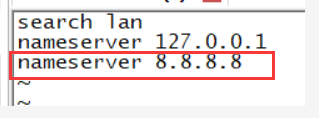
::::If ping Domain name fail,add “nameserver 8.8.8.8” to /etc/resolv.conf | |||
::::[[File:Usb_4g_14.PNG]] | |||
::::[[File:Usb_4g_15.PNG]] | |||
*(10) If you use mPCIE interface 4G module to connect R2 by 14 pin header,use these cmds to enable 4G module,after you did these steps,USB0 port will be disable. | |||
::cd /sys/class/gpio/ | |||
::echo 266 > export 【# 266(gpio_offset) = 232(base) + 34(GPIO_34)】 | |||
::cd gpio266/ | |||
::echo out > direction | |||
::echo 1 > value | |||
=How to use BPI-4G LTE module with BPI-W2= | =How to use BPI-4G LTE module with BPI-W2= | ||
==start== | |||
Latest revision as of 13:25, 10 May 2018
BPI-4G LTE module with banana pi
How to use BPI-4G LTE module with BPI-R2
Get startting
- forum pthread for discuss : http://forum.banana-pi.org/t/how-to-use-bpi-4g-lte-module-with-bpi-r2/5223/4

1.Firstly, use R2 connects LTE module by USB or 14pin Headers. then execute command "lsusb" to have a look if R2 have drove the module. The red box is the id of 4G module.

After seeing this, execute command "ls /dev/ttyUSB*" to make sure the 4G module have been recognised as USB devs.

2. Execute the "./ppp1.sh &"

then execute command “ifconfig -a”,you will see ppp0

3. Execute command ”wget -O speedtest-cli https://raw.githubusercontent.com/sivel/speedtest-cli/master/speedtest.py” to download speed test tool.

4. Execute command "chmod +x speedtest-cli", then execute "./speedtest-cli"

ppp1_success_log.txt : http://forum.banana-pi.org/uploads/default/original/2X/e/eb7d46a0971c25f6337116d60e76590ce298b676.txt
FAQ
- (1) You could get ppp1.sh from here : https://pan.baidu.com/s/1yu0nTNQKPNPzprVPjhOPUA
- (2) Q: What should I do, if you meet this "expect (OK) ^M alarm Failed "
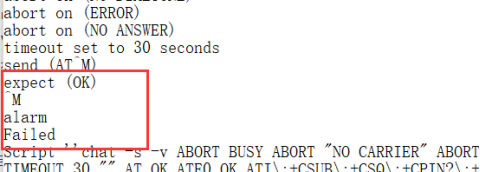
- A:The root cause is the Modem.service has used the module usbserial, so the 4G module can’t use usbserial; we can solve the problem by using command "systemctl disable ModemManager.service " or "systemctl stop ModemManager.service "

- (3) Q:How to test the communication between SIM card and 4G module?
- A:Use minicom, ”minicom -D /dev/ttyUSB2”,and then use AT commands to test, such as ”at”,”at+csq”,“at+ccid”,if you get response without error,that means the communication is OK.
- (4) Q: How to install libqmi?
- A: Download from here: http://www.linuxfromscratch.org/blfs/view/cvs/general/libqmi.html 1 ; then make and make install.
- If you meet this:
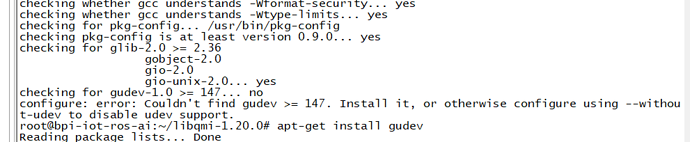
- you need to install libgudev-1.0-dev, then make and make install again.

- (5) Q:How to use qmi-wwan?
- A:There is a very easy way to use,I’ve put quectel-CM in home path of root,just execute “./quectel-CM &”,then execute “dhclient wwan0”,now you have finished the configurations.
- (6) Q:How to use GPS?
- A:BPI-4G module supports GPS and BeiDou,execute “minicom -D /dev/ttyUSB2”,then input AT commands like this:

- if you want to use BeiDou,just input AT commands like this:

- (7) Here are kernel configurations and driver patch for kernel 4.14.
- (8) Support areas:
- EC25-E support: EMEA/Thailand/India/South Korea
- EC25-AU support: Australia
- EC25-V/-A support:North America
- (9) Openwrt Supported:
- A. Clone the source code from this link : BPI-R2 OpenWrt(LEDE) Souce code : 2018-04-11
- B. Add qmi-wwan driver to this project :
- Execute “./scripts/feeds/ install minicom” to install minicom to openwrt project
- Execute “./scripts/feeds/ install python” to install python to openwrt project
- Execute “make menuconfig”
- Add minicom “Utilities —> Terminal —> minicom”
- Add python “Languages —> Python”
- Add driver “Network —> wwan …Genetic OpenWrt 3G/4G proto handler”
- Add "Kernel modules —> USB Support —>
- kmod-usb-core
- kmod-usb-net —> kmod-usb-net-qmi-wwan
- kmod-usb-ohci
- kmod-usb-serial —> kmod-usb-serial-option , kmod-usb-serial-wwan
- kmod-usb-uhci
- kmod-usb2-*
- Use these source files to replace your openwrt project source files (“build_dir/target-arm_cortex-a7+neon-vfpv4_musl_eabi/linux-mediatek_32/linux-4.9.44/drivers/usb(or net)/…”) :


- C. Image & Stuff Link :
- D. Cross-Compile quectel-CM
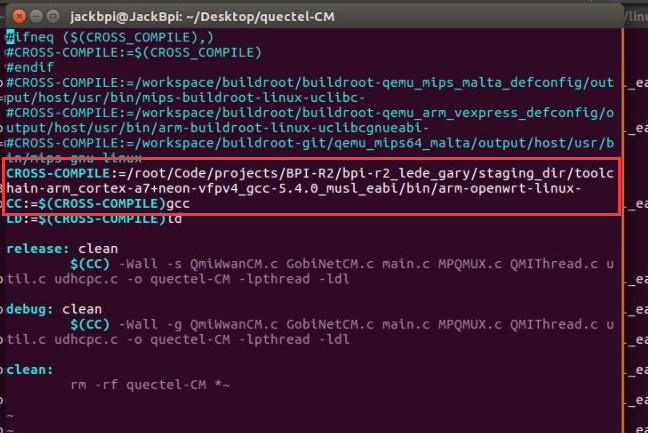
- Copy “quectel-CM” to Linux host PC,and change “Makefile” under the “quectel-CM”,change tools like this:The tools are under openwrt project,you can find them according to the following picture.
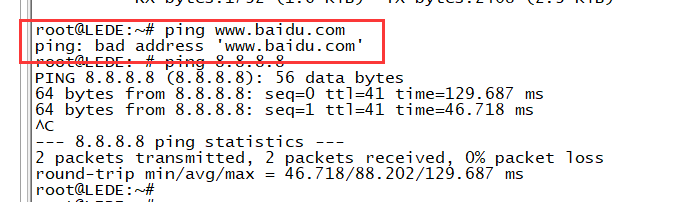
- If ping Domain name fail,add “nameserver 8.8.8.8” to /etc/resolv.conf
- D. Cross-Compile quectel-CM


- (10) If you use mPCIE interface 4G module to connect R2 by 14 pin header,use these cmds to enable 4G module,after you did these steps,USB0 port will be disable.
- cd /sys/class/gpio/
- echo 266 > export 【# 266(gpio_offset) = 232(base) + 34(GPIO_34)】
- cd gpio266/
- echo out > direction
- echo 1 > value